A simple way to lock files until clients pay
01
Upload & Lock
Drop your files in. Set a price.
02
Share
Send one link. Files stay locked.
03
Pay & Unlock
Files open the moment they pay.
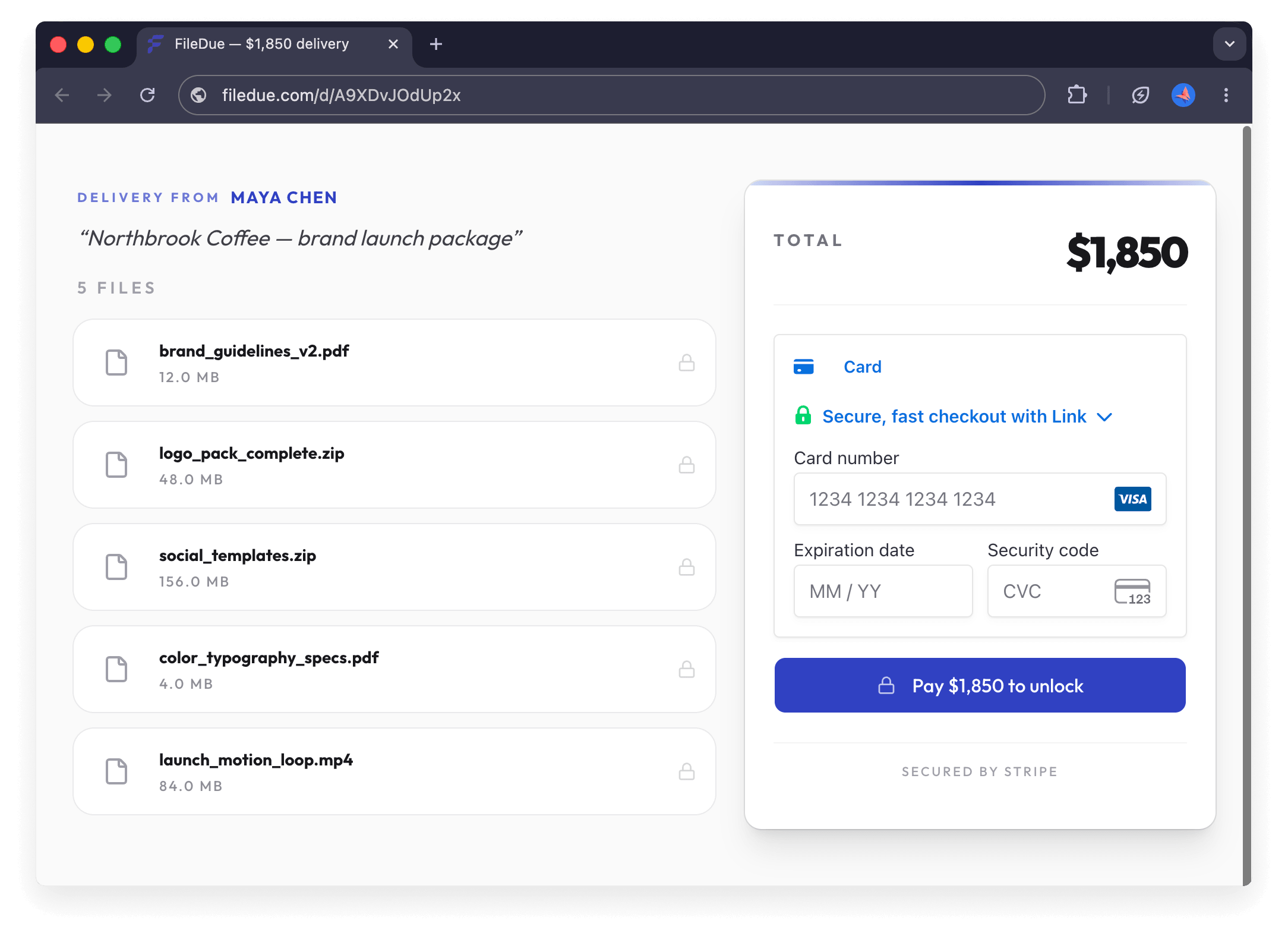
FileDue gives freelancers a one-link way to deliver work that stays locked until the client pays. Upload your files, set a price, and share a single link. Your client sees the files and the price, then pays through Stripe before the download unlocks. No subscription, no client signup, no storefront — just a paid delivery link that does one thing well. FileDue takes a flat 2% only when the link is paid. If no one pays, you pay nothing.
You sent the files. They went quiet.
Most freelancers still deliver work the same way: send files, send an invoice, then wait. And chase. And wait some more.
The third follow-up
Two weeks in. You're typing some version of "just checking in" for the third time, trying to keep the friendly tone you started with.
The client goes quiet
Three weeks in. Some clients pay slowly. Others stop responding once the files are in their hands. Your leverage disappeared the moment you hit Send.
Chasing your own money
A month overdue. You can keep nudging politely, or escalate and risk the relationship. Neither feels right — and either way, you're spending unpaid hours on payment instead of the next project.
FileDue flips the order. Payment comes first. The files unlock themselves.
See it in action
From upload to unlock — the full FileDue flow, no edits.
Watch the full flow: upload your files, set a price, share one link. Your client pays through Stripe, and the files unlock instantly. No edits, no cuts — this is the actual product.
Built for any freelancer who delivers files
Designers, developers, writers, photographers, video editors, translators — anyone who ships work and waits to get paid.
Designers
Logos, brand kits, design files
Developers
Source code, project files, deliverables
Writers
Articles, landing page copy, manuscripts, documents
Photographers
Edited galleries, RAW files, ZIP archives, final photo sets
Video editors
Final cuts, source footage, project files, exports, motion assets
Translators
Translated documents, subtitle files, localized content
Real-world delivery scenarios for each type of freelance work.
Every part of FileDue is built around getting paid before delivery
How FileDue is built and why each choice is tailored to make you get paid.
Files unlock only after payment
No more sending work and hoping. The client sees the files exist, sees the price, and pays before anything downloads. No payment, no files.
Payments go directly to your Stripe account
Clients pay you directly through your own Stripe account, not FileDue. We take a flat 2% and never touch your money — Stripe holds it, you control it.
Files stay in your client's region
Choose EU or US data jurisdiction per link. Files are stored in regional R2 buckets — important for GDPR, useful for everyone else.
Clients pay without signing up
Your client clicks the link, sees the files, pays. No FileDue account. No storefront. Just a delivery link that does its job.
Simple pricing
First 3 links free.
Then 2% per paid link.
No subscription.
You only pay when you get paid.
Questions, answered.
How does the payment gate work?
Upload your files and set a price. Your client gets a link, pays by card, and the files unlock instantly. Payment goes directly to your Stripe account.
When should I use FileDue?
When the work is done and ready to deliver. Instead of sending files and chasing payment, send the link and get paid first.
Will this feel weird or aggressive to my client?
Usually not. Your clients already pay for software, subscriptions, and digital products online every day. FileDue just turns your delivery into a clear payment step - not a follow-up conversation.
Do I need to set up Stripe?
Yes. FileDue uses Stripe Connect, so payments land directly in your Stripe account. Connect an existing one or create a new one — takes a couple of minutes.
What file types can I deliver?
Any file type - PSDs, ZIPs, videos, PDFs, source files. If you can upload it, you can lock it behind payment.
What's the file size limit?
Up to 5 GB per delivery, up to 500 files. That covers most design packages, photo galleries, video exports, and code archives.
What's the fee?
Your first 3 paid links are free. After that, FileDue charges a flat 2% per paid link. Stripe charges their card processing fee separately.
Is it safe for my client to pay through FileDue?
Yes. Payments are handled by Stripe, which sends money directly to your account. Card details never touch FileDue.
What if my client never pays?
FileDue prevents this scenario by locking files until payment clears. For past situations where this already happened, our free email templates can help you recover (or close out gracefully).
What if my client wants a refund?
Refunds are between you and your client through Stripe. FileDue's 2% fee is non-refundable on completed payments.
Does my client need to create an account?
No. They open the link, pay by card, and the files download instantly. Zero friction.
Why not just send an invoice?
Invoices aren't guaranteed to be paid. FileDue is for the moment after the work is finished - when you'd rather not send files first and hope payment follows.
Can I preview what my client will see?
Yes. Every link you create includes a preview URL so you can see the exact client experience before sending.
Can I reuse the same link for multiple clients?
No. Each delivery creates a unique link for one client. You can create as many deliveries as you need.
What happens to my files after delivery?
Files are stored securely and available for download for 30 days after payment - enough time for your client to access everything. After that they're automatically removed.
Is this just a file hosting service?
No. FileDue is a payment gate — files only unlock after the client pays. Storage is part of the flow, not the point.
What if the client asks to pay outside the link?
That's your call. But FileDue exists to skip that conversation entirely — 'here's the link, files unlock on payment' is the whole negotiation.
More guides for freelancers on the blog.
Lock files until clients pay
Free email templates for freelancers
Payment reminders, delivery notes, scope pushback, proposal follow-ups, and client ghosting emails — ready to copy.
Browse templatesFeatured on